OpenMMCalculator
-
class
narupatools.ase.openmm.calculator.OpenMMCalculator(simulation: openmm.app.simulation.Simulation, atoms: Optional[ase.atoms.Atoms] = None, **kwargs: Any)¶ Simple implementation of a ASE calculator for OpenMM.
The context of the OpenMM simulation is used to compute forces and energies given a set of positions. When the ASE Atoms object has its positions changed by an integrator, these changes are pushed to the OpenMM context to enable the calculation of new forces and energies.
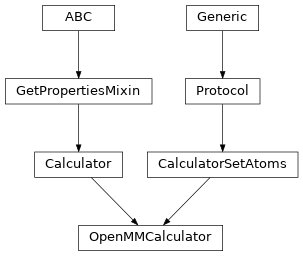
Inheritance
Methods
Create a calculator for the given simulation.
Create band-structure object for plotting.
Do the calculation.
Calculate numerical forces using finite difference.
Calculate numerical stress using finite difference.
This method is experimental; currently for internal use.
Check for any system changes since last calculation.
Calculate magnetic moments projected onto atoms.
Get the named property.
the calculator should return intensive stresses, i.e., such that stresses.sum(axis=0) == stress
Read atoms, parameters and calculated properties from output file.
Clear all information from old calculation.
Set parameters like set(key1=value1, key2=value2, …).
Called when this is assigned using
set_calculator().Set label and convert label to directory and prefix.
-
__init__(simulation: openmm.app.simulation.Simulation, atoms: Optional[ase.atoms.Atoms] = None, **kwargs: Any)¶ Create a calculator for the given simulation.
- Parameters
simulation – OpenMM simulation to use as a calculator.
atoms – Atoms object to which this calculator will be attached.
kwargs – Dictionary of keywords to pass to the base ASE calculator.
-
band_structure()¶ Create band-structure object for plotting.
-
calculate(atoms: Optional[ase.atoms.Atoms] = None, properties: Collection[str] = ('energy', 'forces'), system_changes: List[str] = ['positions', 'numbers', 'cell', 'pbc', 'initial_charges', 'initial_magmoms']) → None¶ Do the calculation.
- properties: list of str
List of what needs to be calculated. Can be any combination of ‘energy’, ‘forces’, ‘stress’, ‘dipole’, ‘charges’, ‘magmom’ and ‘magmoms’.
- system_changes: list of str
List of what has changed since last calculation. Can be any combination of these six: ‘positions’, ‘numbers’, ‘cell’, ‘pbc’, ‘initial_charges’ and ‘initial_magmoms’.
Subclasses need to implement this, but can ignore properties and system_changes if they want. Calculated properties should be inserted into results dictionary like shown in this dummy example:
self.results = {'energy': 0.0,
                'forces': np.zeros((len(atoms), 3)),
                'stress': np.zeros(6),
                'dipole': np.zeros(3),
                'charges': np.zeros(len(atoms)),
                'magmom': 0.0,
                'magmoms': np.zeros(len(atoms))}
The subclass implementation should first call this implementation to set the atoms attribute and create any missing directories.
-
calculate_numerical_forces(atoms, d=0.001)¶ Calculate numerical forces using finite difference.
All atoms will be displaced by +d and -d in all directions.
-
calculate_numerical_stress(atoms, d=1e-06, voigt=True)¶ Calculate numerical stress using finite difference.
-
calculate_properties(atoms, properties)¶ This method is experimental; currently for internal use.
-
calculation_required(atoms, properties)
-
check_state(atoms, tol=1e-15)¶ Check for any system changes since last calculation.
-
export_properties()
-
get_atoms()
-
get_charges(atoms=None)
-
get_default_parameters()
-
get_dipole_moment(atoms=None)
-
get_forces(atoms=None)
-
get_magnetic_moment(atoms=None)
-
get_magnetic_moments(atoms=None)¶ Calculate magnetic moments projected onto atoms.
-
get_potential_energies(atoms=None)
-
get_potential_energy(atoms=None, force_consistent=False)
-
get_property(name, atoms=None, allow_calculation=True)¶ Get the named property.
-
get_stress(atoms=None)
-
get_stresses(atoms=None)¶ the calculator should return intensive stresses, i.e., such that stresses.sum(axis=0) == stress
-
read(label)¶ Read atoms, parameters and calculated properties from output file.
Read result from self.label file. Raise ReadError if the file is not there. If the file is corrupted or contains an error message from the calculation, a ReadError should also be raised. In case of succes, these attributes must set:
- atoms: Atoms object
The state of the atoms from last calculation.
- parameters: Parameters object
The parameter dictionary.
- results: dict
Calculated properties like energy and forces.
The FileIOCalculator.read() method will typically read atoms and parameters and get the results dict by calling the read_results() method.
-
classmethod
read_atoms(restart, **kwargs)
-
reset()¶ Clear all information from old calculation.
-
set(**kwargs)¶ Set parameters like set(key1=value1, key2=value2, …).
A dictionary containing the parameters that have been changed is returned.
Subclasses must implement a set() method that will look at the chaneged parameters and decide if a call to reset() is needed. If the changed parameters are harmless, like a change in verbosity, then there is no need to call reset().
The special keyword ‘parameters’ can be used to read parameters from a file.
-
set_atoms(atoms: ase.atoms.Atoms) → None¶ Called when this is assigned using
set_calculator().- Parameters
atoms – ASE atoms object this calculator has been assigned to.
-
set_label(label)¶ Set label and convert label to directory and prefix.
Examples:
label=’abc’: (directory=’.’, prefix=’abc’)
label=’dir1/abc’: (directory=’dir1’, prefix=’abc’)
label=None: (directory=’.’, prefix=None)
-
todict(skip_default=True)
Attributes
Default parameters
Whether we purge the results following any change in the set() method.
Properties of Atoms which we ignore for the purposes of cache
Properties calculator can handle (energy, forces, …)
-
directory
-
discard_results_on_any_change= False¶ Whether we purge the results following any change in the set() method.
-
implemented_properties: List[str] = ['energy', 'forces']¶ Properties calculator can handle (energy, forces, …)
-
label
-